Feature Availability
This feature is only available on certain Poppulo packages. For more details, see our packages and pricing page
Audience Recommendations helps you identify the right audience for your email by analyzing your communication content and recommending who should receive it. Instead of manually building an audience, you can use AI to generate a recommended audience definition, review it, and save it as a Saved Search for your communication.
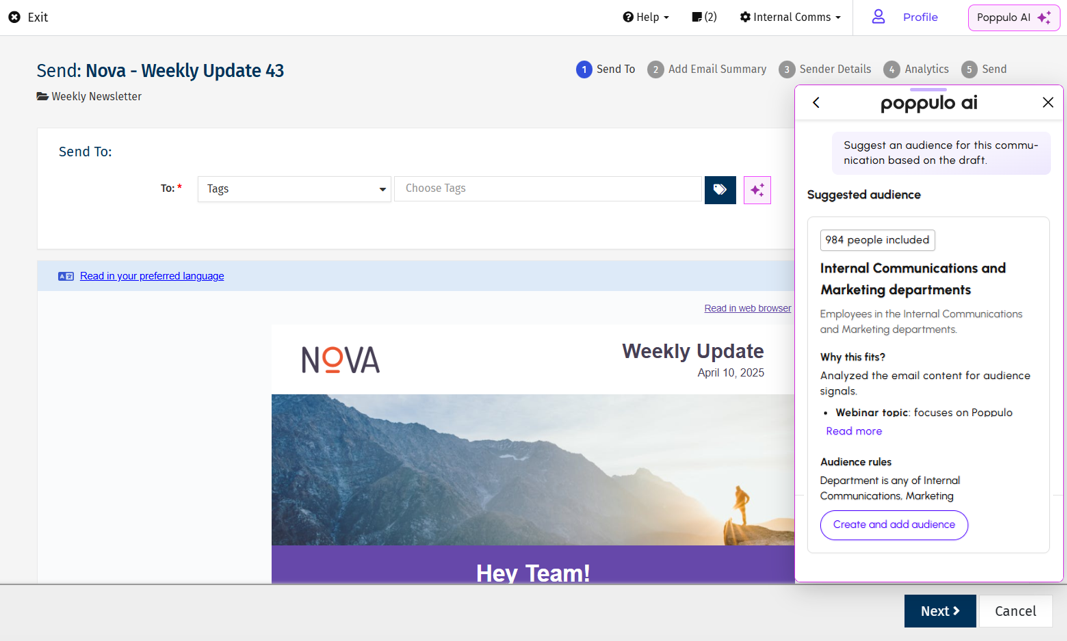
Generate an Audience Recommendation
Poppulo AI analyzes the content and intent of your email to recommend an audience based on your organization's employee attributes.
- Create your email using the standard email creation workflow. You can write the content yourself or use Poppulo AI for Content Creation to generate or refine it.
- Create your email and proceed to Approve and Send or Approve and Schedule Send.
Note: Audience recommendations are not available for Quick Test or Send for Review.
- Next to the To field, click the Poppulo AI icon.
- In the Poppulo AI panel, choose one of the following options:
- Click Suggest audience from draft to generate an audience based on your email content.
- Or enter a description of the audience you want to reach in the prompt field. You can type your description or select the microphone icon to use voice input. For example, Managers in Operations in EMEA.
Note: When using voice input, allow microphone access in your browser if prompted. As you speak, your words are transcribed into the prompt field. You can review and edit the transcription before submitting it. Voice input is currently available in English, with near real-time transcription supported in Chrome and Safari.
- Poppulo AI analyzes your request and displays a suggested audience that includes:
- The number of people included
- A suggested audience name
- A description of the audience
- Why the audience was recommended
- The audience rules that will be used to create the Saved Search
If needed, click
Read more to view the full explanation of why the audience was recommended.
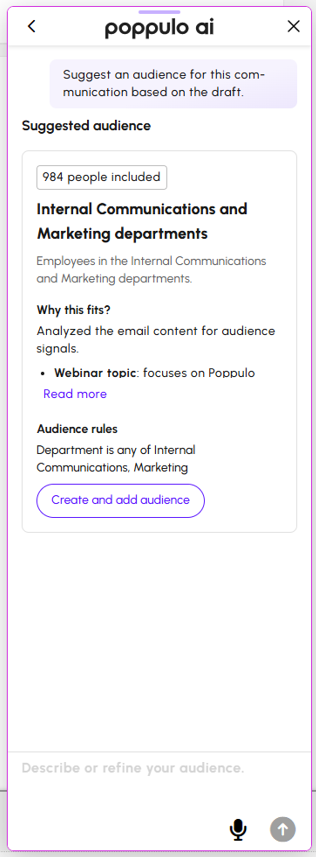
- If the recommendation doesn't match your needs, enter another prompt to refine it. Poppulo AI updates the recommendation based on your request.
- When you're satisfied with the recommendation, click Create and add audience. Poppulo AI creates a new Saved Search and automatically adds it to the To field.
Refine an Audience Recommendation
If the initial recommendation does not fully match your intended audience, you can continue the conversation with Poppulo AI.
For example, you might ask the AI to:
- Include employees from an additional location.
- Exclude a specific department.
- Limit the audience to people managers.
- Change the audience name
- Ask what criteria are being used to build the Saved Search
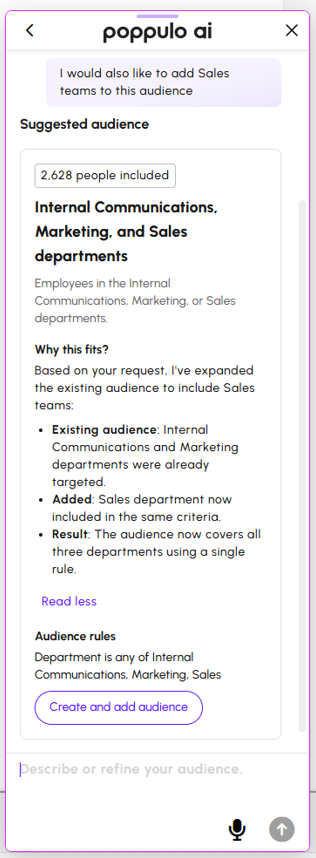
The recommendation updates based on your request, allowing you to review the revised audience before applying it.
Once the recommendation has been converted into a Saved Search, you can also manually adjust the search criteria before sending your communication.
Things to Know
- Audience recommendations are generated using your organization's employee attributes and the content of your communication.
- Recommendations should always be reviewed before sending.
- The quality of recommendations depends on the accuracy and completeness of your employee data.
- Your account must have Enterprise People Management (EPM) enabled to use this feature.
- You must have permission to create and use Saved Searches.
- Applying a recommendation creates a Saved Search.
- Poppulo AI cannot create Tags or Distribution Lists.
- Poppulo AI does not recommend existing Saved Searches, Tags, or Distribution Lists.
Example Use Cases
Audience Recommendations can help you quickly identify the right audience for communications such as:
- Office announcements that apply only to employees in a specific location.
- HR or Learning & Development campaigns targeted to specific departments.
- Policy updates intended only for people managers.
- Regional communications that apply only to employees in a particular country or region.
By generating audience recommendations directly from your communication, Poppulo AI helps reduce manual audience building while making it easier to send targeted communications with confidence.
