The Roles Tab available is available in your Enterprise Settings. It shows you a list of the Roles you can assign when you Create a User in Enterprise. To access the roles tab, follow the instructions below.
Enterprise Roles
Enterprise roles provide access to Enterprise-level administration and user management. These roles are typically assigned to users who need to manage the Enterprise account, groups, sub-accounts, or users.
The following Enterprise roles are available:
- Enterprise Administrator: This role provides full administrative access to the Enterprise account. Enterprise Administrators can manage users, roles, groups, and sub-accounts. They also have full access to all sub-accounts within the Enterprise. This role can be assigned by an existing Enterprise Administrator.
- Enterprise Group Manager: This role provides administrative access to a specific Sub-Account Group. Enterprise Group Managers can view and manage users within their assigned group and access all sub-accounts that belong to that group. This role can be assigned by an existing Enterprise Administrator.
- Enterprise Integrations Manager: This role is intended for users who are responsible for managing Enterprise integrations. Enterprise Integrations Managers have access only to Integrations Manager at the Enterprise level and do not have access to sub-accounts, People, or Reporting. The Enterprise Integrations Manager role is assigned by Poppulo Support and cannot be assigned by an Enterprise Administrator. Contact Poppulo Support if you would like to assign this role to a user.
- Enterprise Systems Administrator: This role is intended for IT, security, and governance administrators who need to manage users and permissions across the Enterprise account without access to communication content. Enterprise Systems Administrators can manage users and roles across the Enterprise and assign permissions as required. They can view limited Enterprise-level information, such as communication titles and folder names, but cannot create, edit, or access communication content, campaigns, calendar content, or sub-account content. The Enterprise Systems Administrator role is assigned by Poppulo Support and cannot be assigned by an Enterprise Administrator. Contact Poppulo Support if you would like to assign this role to a user.
To Access the Roles Tab:
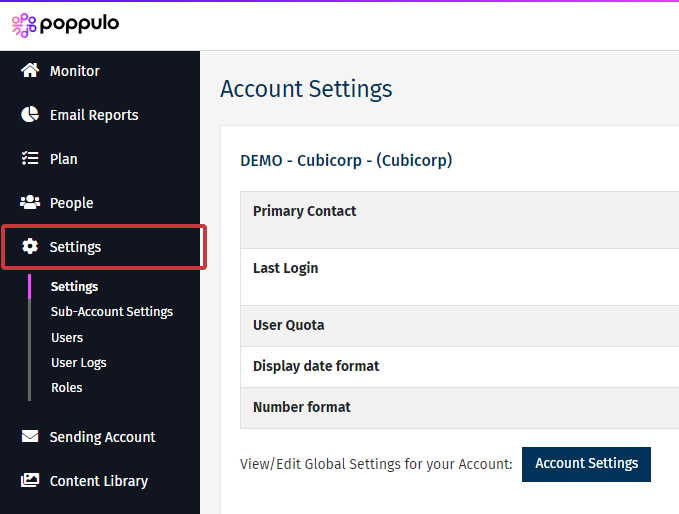
- In Enterprise, select Settings from the menu on the left.
-
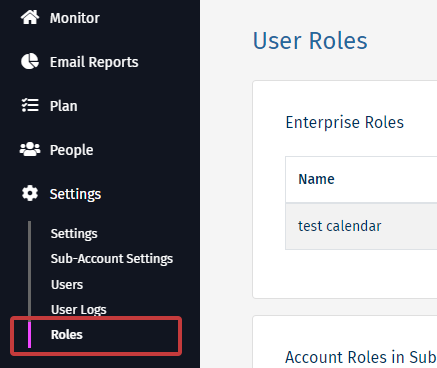
Choose Roles from the submenu.
-
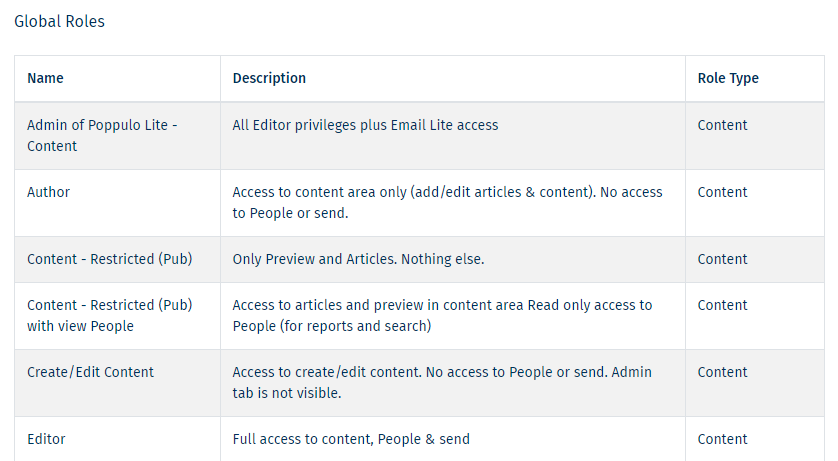
This Global Roles displays the roles you can assign to your users.